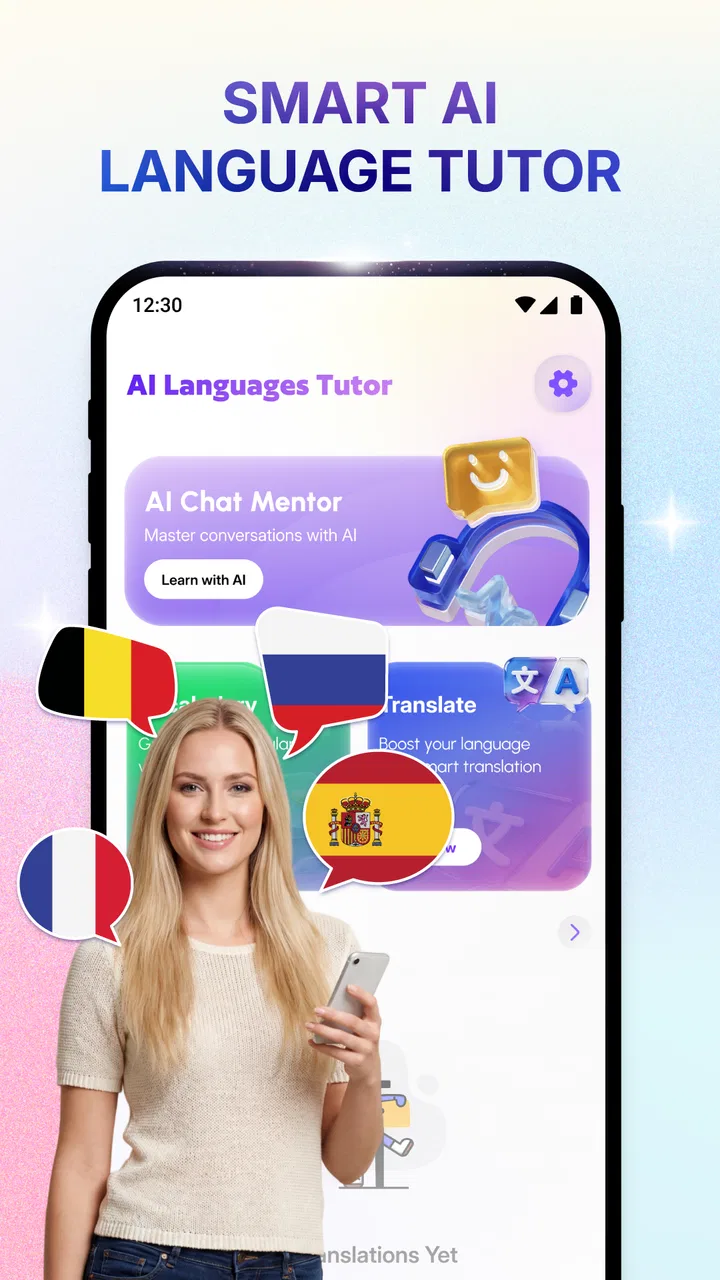
AI Language Tutor - Translate
- 0.0
- Rating
- 100.00K
- Installs
- Free
- Price

 Analysis by App-foxy
I approached AI Language Tutor - Translate as a practical study companion rather than a complete language course. Its purpose is clear: help me build vocabulary, practise speaking, and use an AI tutor when I want quick interaction instead of a static exercise sheet. That makes it interesting for short, regular study sessions, especially when I have a question or want to rehearse a phrase immediately.
The app comes from Skytechlab Global App and sits in the education category. It is free to use, rated for Everyone, and supports devices running Android 8.0 or later. Its current version is 1.0.2_20260416, and it has passed the 100K+ install mark. The average rating is currently 0.0, so I would treat the app as a relatively early product and judge it by its actual workflow rather than by public feedback.
How the app feels during everyday language practice
The most appealing part of this language tutor is the immediacy of the idea. Traditional study apps often make me follow a fixed route: choose a lesson, complete an exercise, review a list, and move on. An AI tutor suggests a more flexible routine. I can start with a phrase I need today, practise a speaking situation, or focus on vocabulary that has appeared in my own life.
You May Also Like

 Blood Strike: 2.5 Anniversary
Blood Strike’s Loadouts Turn Every Drop Into a Tactical Gamble
A close look at Blood Strike’s custom loadouts: how fast access to signature weapons reshapes its battle royale rhythm, rewards preparation, and narrows the gap between fights.

 Pandora - Music & Podcasts
Pandora’s Music Is Easy to Start, but Harder to Recover
Pandora’s strength is its low-effort path from a seed to a station. Its weak spot is how much confidence it asks you to place in connection, setup, and quiet recovery.

 8 Ball Pool
 Is Built on Rivalries, Rematches, and Routine
A close look at the rivalries, rematches, shared routines, and unanswered safety questions that turn a quick pool match into a persistent mobile community.

 Samsung Music
’s Quiet Strength Is Playing What You Already Own
Its reach comes less from spectacle than from dependable access to a personal library. That simplicity is both the app’s strongest retention engine and its ceiling.

 AccuWeather: Weather Radar
AccuWeather Review: A Quick, Clear Forecast for Everyday Decisions
For everyday plans, the best forecast is the one you can understand quickly. AccuWeather makes rain timing, radar, and local conditions easy to act on, with a few trade-offs.

 Hill Climb Racing
Why Hill Climb Racing Still Turns Crashes Into One More Run
A tiny car, a bumpy hill and one more upgrade: Hill Climb Racing keeps resurfacing because its simple chaos makes every near-miss feel personal.
More From Our News Desk



That flexibility is useful, but it also changes how much responsibility sits with the learner. A structured course tells me what to study next. An AI-based tool gives me more freedom, which can be helpful when I already know my goal, but less helpful when I need a carefully sequenced curriculum. I would use this app as an active practice layer, not automatically as my only source of grammar instruction.
For example, imagine I am preparing for a short trip and want to rehearse ordering food. I could use a session to collect useful words, practise saying a request, and then repeat the situation until the wording feels natural. The benefit is that the practice can stay close to a real need. Instead of memorising unrelated vocabulary, I am working on language I am likely to use that week.
What to expect from the speed of interaction
AI features naturally depend on processing each request, so I would not approach this as an instant flashcard tool in every situation. A vocabulary review can feel more direct than a conversational exchange, while speaking practice may require extra time for the app to interpret what I say and prepare a response. The important distinction is that a small pause is not necessarily a problem; it is part of using a responsive tutor rather than tapping through fixed screens.
When I want a fast five-minute session, I would keep my prompts and goals narrow. Asking for a focused vocabulary exercise is more practical than trying to cover an entire language topic at once. This is one of my main tips for getting better results: decide whether the session is for words, speaking, or a specific situation before starting. A clear target makes an AI conversation easier to use and prevents the practice from becoming unfocused.
The app is best suited to moments when I can give it my attention. It is not the kind of tool I would rely on while rushing between tasks, because speaking exercises require me to listen, respond, and notice corrections. For a quick commute session, vocabulary work may be more comfortable. At home, with fewer distractions, speaking practice makes more sense.
Where heavier use can change the experience
Short sessions are the natural fit here, but repeated AI interaction can place more demand on a device and on the connection than ordinary text-only study. I would expect the most demanding moments to be those involving extended conversation or frequent speaking attempts. That does not make the app unsuitable for longer practice, but it gives me a reason to divide study into manageable blocks.
I find that approach useful for learning as well. Instead of spending one long stretch asking for endless examples, I would work through a small topic, pause, and then return to it later. This creates a chance to remember the words without depending on a continuous conversation. It also makes it easier to notice whether the tutor is genuinely helping or whether I am simply generating more text without retaining anything.
A practical workflow is to begin with vocabulary, move into a short speaking exercise, and finish by writing down the two or three expressions I actually want to remember. The final step matters because an AI session can feel productive even when the learner has not selected anything for later review. The app can support practice, but I still need a personal habit for turning that practice into memory.
I would also avoid treating every generated correction as an absolute rule without thinking about context. Language has different levels of formality, regional choices, and several acceptable ways to express the same idea. If a phrase sounds unnatural to me, I would ask for a simpler alternative or an explanation of when it is used. That follow-up habit is more valuable than accepting the first answer automatically.
Reliability and recovering from interruptions
For a language tool, reliability is not only about opening successfully. It is also about whether I can maintain a useful session when an exchange is interrupted, a response takes longer than expected, or I need to change direction. I would keep important notes outside the conversation rather than assuming every useful phrase will remain easy to find later.
This is especially important for speaking practice. If I am working through a role-play and the session stops, having a short written goal helps me restart without losing the point of the exercise. I might note the situation, the vocabulary I am targeting, and one sentence I want to improve. That recovery method is simple, but it prevents a technical interruption from becoming a complete loss of study time.
I also prefer to test the app with a small session before depending on it for an important learning task. For instance, I would not make it my only preparation tool immediately before a presentation or trip. I would first check how comfortably it fits my device, how clearly I can follow the interaction, and whether its explanations match my learning level. This is sensible for any newer app, particularly one whose public average rating is still shown as 0.0.
That rating should not automatically be read as a negative judgement. It simply gives me little community guidance to work with, so personal testing matters more. The install count shows that the app has reached over one hundred thousand devices, but popularity alone does not tell me whether the teaching style fits my needs. I would use the free access as an opportunity to evaluate it without making a financial commitment.
Device limits and sensible expectations
Support for Android 8.0 or later makes the app available to many older Android phones and tablets, which is useful for learners who do not own a recent flagship device. Still, operating-system compatibility does not guarantee an identical experience on every device. Screen size, microphone quality, available storage, background activity, and network conditions can all affect how comfortable an AI language session feels.
For speaking exercises, the microphone deserves special attention. A quiet room and clear pronunciation give the tutor a better chance of handling the interaction smoothly. If I practise in a noisy café, I would be careful about judging the app too harshly because the environment may be the real obstacle. Headphones can make listening easier, while a calm space is likely to be more useful than simply using the newest phone.
Resource use is another reason I would avoid leaving the app active unnecessarily. AI interaction can be more demanding than reading a downloaded word list, particularly when I repeat voice exercises. I would close the session when I finish and keep practice intentional. This is not a criticism of one specific technical implementation; it is a sensible habit whenever an app combines interactive tutoring with speaking work.
Older hardware may still be perfectly adequate for short vocabulary sessions, but I would be more cautious about expecting a completely effortless experience during long, voice-heavy practice. If the app feels slow on a particular device, I would first reduce the session length, check the connection, and try a quieter environment before deciding that it is unsuitable. These small adjustments can separate a useful tool from an unnecessarily frustrating one.
Useful ways to fit it into a study routine
I would use the app in three different modes rather than opening it without a plan. The first is a vocabulary capture session. When I encounter a new group of words, I can use the tutor to explore meanings and create examples connected to situations I recognise. The second is a speaking rehearsal, where I practise saying a request, question, or introduction. The third is a repair session, where I return to a sentence I could not express comfortably and try to improve it.
The repair session is the least obvious but perhaps the most useful. Many learners collect new words while avoiding the exact phrases that cause difficulty. I would bring those awkward sentences into the app and ask for simpler versions, more natural alternatives, or a short dialogue using them. This keeps the AI tutor connected to a real weakness instead of turning it into an endless source of random examples.
Another good workflow is to change the level of help gradually. At the beginning, I might ask for a model sentence. Then I would try to produce my own version without looking at it. Finally, I would ask for feedback on my attempt. That sequence makes the app a practice partner rather than a phrase generator. If I always request the answer first, I may recognise the language without being able to produce it independently.
I would also keep the sessions short enough to review afterwards. A long exchange can create a lot of material, but reviewing everything is unrealistic. Selecting a few expressions gives me a manageable follow-up task. This is where the app works best alongside a notebook, a flashcard system, or another study method. It offers interaction; another tool or personal routine can provide longer-term organisation.
Who will benefit most, and who should choose another option
I think this app is a good match for learners who dislike rigid lesson paths and want to practise language connected to immediate situations. It may also suit people who already know the basics and need more opportunities to form sentences aloud. Travellers, casual learners, and busy users who can only study in short bursts may appreciate being able to start with a specific goal.
It is less convincing as a sole choice for someone who needs a complete, carefully graded course from the alphabet onward. A conventional textbook, classroom programme, or highly structured language platform may be better for learners who want a fixed syllabus, detailed progression, and a clear sequence of grammar topics. The AI format gives flexibility, but flexibility can become a weakness when I do not know what to study next.
I would also look elsewhere if my main requirement were a large social community, formal teacher feedback, or a specialised exam-preparation plan. The app’s central value is the AI tutor experience, vocabulary building, and immediate speaking practice. Those strengths do not automatically replace human correction or a curriculum designed around a particular examination.
Compared with ordinary translation tools, this app has a more educational purpose. A translator is usually the faster choice when I need to understand one sentence immediately. Here, I would expect more value when I want to practise that sentence, adapt it to a conversation, and say it myself. Compared with flashcard apps, the difference is interaction: flashcards are often better for systematic repetition, while this tutor is more useful for turning words into active language.
My performance verdict after weighing the trade-offs
My overall view is that AI Language Tutor - Translate is promising as a focused, flexible practice companion. Its strongest use is not replacing every other learning method, but filling the gap between knowing a word and trying to use it. The combination of vocabulary work and instant speaking practice gives it a practical role in a daily routine, especially when I have a concrete situation to rehearse.
The performance expectations should remain realistic. Short, focused sessions are likely to be the most comfortable approach, while extended voice interaction may demand more patience from both the device and the learner. A supported Android version as old as 8.0 is encouraging for accessibility, but I would still test the app on my own phone and pay attention to microphone quality, connection stability, and how easily I can resume after an interruption.
The fact that it is free lowers the risk of trying it, and the Everyone age rating makes it approachable for a broad audience. At the same time, the new-feeling version number and the current 0.0 average rating mean I would keep my expectations measured. I would not abandon a structured course for it after one session. I would give it a fair trial through several specific tasks: a vocabulary session, a speaking rehearsal, and a correction-focused exercise.
My recommendation is to use it as an active practice partner, not as a complete language-school replacement. If you want fast access to an AI tutor and enjoy setting your own goals, it is worth exploring. If you need a guaranteed sequence, formal assessment, or deep human guidance, another option will probably serve you better. For me, its real value appears when I bring a genuine language problem to the session and leave with a phrase I can actually use.
FAQs for AI Language Tutor - Translate
01What platforms is AI Language Tutor - Translate available on?
AI Language Tutor - Translate is available on both Android and iOS platforms. Users can download the app from the Google Play Store for Android devices and the Apple App Store for iOS devices. It's designed to be accessible on smartphones and tablets, ensuring a wide compatibility range.
02How does AI Language Tutor help improve language skills?
The app uses advanced AI algorithms to provide real-time translations and language learning tools. It offers interactive lessons, speech recognition for pronunciation practice, and personalized feedback to help users improve their language skills efficiently. Whether you’re a beginner or advanced learner, it adapts to your level.
03Is an internet connection required to use AI Language Tutor - Translate?
While many features of AI Language Tutor - Translate require an internet connection for real-time translations and updates, the app also offers offline capabilities. Users can download specific language packs to access essential translation and learning tools without needing to be online, making it useful on the go.
04What languages are supported by AI Language Tutor - Translate?
The app supports a wide range of languages, including popular ones like Spanish, French, Chinese, German, and Japanese, among others. The developers regularly update the app to include more languages and dialects, ensuring users have access to a comprehensive language learning and translation tool.
05Are there any subscription fees for using AI Language Tutor - Translate?
AI Language Tutor - Translate offers both free and premium subscription options. The free version includes basic translation and learning features, while the premium subscription unlocks advanced tools, ad-free experience, and more comprehensive lessons. Users can choose the plan that best fits their learning needs and budget.
Pros
- User-friendly interface enhances learning.
- Wide range of languages available for translation.
- Real-time conversation practice boosts fluency.
- Personalized learning paths for each user.
- Offline mode supports learning without internet.
Cons
- Limited advanced grammar explanations.
- Occasional inaccuracies in complex translations.
- Requires a subscription for premium features.
- Voice recognition can struggle with accents.
- No support for dialect-specific translations.

AI Language Tutor - Translate
Gallery